Shopkick’s shopBeacon (iBeacon/BLE) trial live at Macy’s in SF
It’s like living in the future 🙂
iOS7 vs KitKat Adoption
Full Disclaimer: Still an Apple Fanboy
That said as a developer of mobile and tablet apps, I live in both worlds so the adoption rate of new operating systems is of key interest for me.
According to mixpanel, as of this morning ~80% of iOS users are now running iOS7 (chart).
In comparison only 1% of android users are running KitKat. To be fair iOS7 was released more than a month before KitKat but the numbers are nonetheless staggering.
Happy Coding!
“I don’t like documenting my code. If it was hard to write it should be hard to read”
– Anonymous
App Launch: Yank

My latest project, Yank hit the iOS app store today.
Yank provides users the ability to send an emergency alert to friends and family simply by ‘Yank’-ing the headphones out of your iPhone’s audio jack.
Design by @ericajaclyn

Github Gist for converting hex color values
Once in a while we run into client style guides whose colors are all specified in hex values. Derk. Fortunately, one of the guys I work with found this handy little macro that accepts a hex string and returns a UIColor object. I figured I’d throw it into a Github Gist (see link below).
Happy Coding!
Fortune 100 Study Demonstrates Limitations of Responsive Web Design | The Search Agents
Fortune 100 Study Demonstrates Limitations of Responsive Web Design | The Search Agents.
According to this report from The Search Agents, the average load time for all Responsive Web Design (RWD) sites is over eight seconds. You can draw your own conclusions, but I think everyone can agree that something has gone horribly awry if you have to wait eight seconds for a website to load. Perhaps there was a distortion in the time-space continuum and these RWD were forced to load over a D-Link 56.6K external Voice/Fax/Data modem?
EIGHT SECONDS! My Keurig takes less time to make a cup of coffee!
My Jerry Springer Final Thought: Your mobile strategy has to extend beyond the device. And if you don’t have a mobile strategy well, “You see that flash of light in the corner of your eye…”
iOS7: Just go all-in
Whether you’re upgrading an existing app or building a new app, my advice is to go all-in with iOS7. Like most things in life, it’s easier said than done, but the numbers support me on this point.
If you haven’t already heard, the iOS7 adoption rates have been astronomical. According to stats from mixpanel, in just over one week, almost two-thirds of iOS users have already upgraded to iOS7. SEVEN DAYS, and we’re already over 60%. So the $64k question is: Is it really worth my time, money, and effort to support iOS6? Probably not.
For the devs out there here are a couple of code snippets to get you moving.
That Pesky Status Bar
iOS7 brings with it, full layout (i.e. edge to edge) view controllers and translucent bars (nav bars, status bars, etc.). And because a view controller’s view now extends beneath the status bar, you’ll inevitably run into situations where the status bar blends into its background – making it appear invisible (don’t worry it’s still there).
Prior to iOS7 you could set the tint/style of the status bar with the following code:
[[UIApplication sharedApplication] setStatusBarStyle:UIStatusBarStyle animated:BOOL]
In iOS7 the statusBarStyle (among other things) is more or less handled at the view controller level. Thus depending on your view controller’s content/color you can dynamically set the status bar’s style so that there’s contrast. Here’s how you do it:
1. Implement the following method in your view controller
- (UIStatusBarStyle)preferredStatusBarStyle
2. And any time the method (above) returns a different value, make sure you call:
- (void)setNeedsStatusBarAppearanceUpdate
NOTE: If your view controller is part of a navigation controller’s stack, then you can change the tint of the nav bar and status bar simply by changing the UINavigationBar ‘barStyle’ and/or ‘barTintColor’ properties.
Hope that helps. Happy iOS7 Coding!
Finally, FDA tells mobile health app developers what it plans to regulate
I hope this doesn’t stifle the amazing innovations that have occurred in this space. We’re so close to having an actual tricorder!

More than two years after issuing its draft guidance on the regulation of mobile health apps, the U.S. Food and Drug Administration has finally released its final guidelines.
By some counts, there are about 40,000 health-related mobile apps available for download on the iPhone, Android devices or other smartphones. The vast majority of these apps exist outside the scope of F.D.A regulation, but mobile health app developers have still been waiting for the agency’s final word on where it plans to focus.
On Monday, the F.D.A. said its oversight will apply to two broad categories of apps:
- Those intended to be used as “an accessory to a regulated medical device” – for example, an app that enables a healthcare provider to diagnose a condition by viewing a medical image from a picture archiving or communication system on a smartphone or tablet; or
- Apps that “transform a mobile platform into…
View original post 157 more words
Facebook Partners With PayPal, Stripe, Braintree To Autofill Billing Info In Mobile Commerce Apps
Let’s the finish battle for consumer credit cards once and for all. Apple vs Facebook vs Amazon vs Paypal vs Square. Time for “The Quickening” 🙂
Is the iOS7 NDA lifted yet? How ’bout now?
Happy belated iOS7 day to all the devs out there. Not that the rest of the interwebs paid any attention to the Apple Dev NDA, but now that I’m legally allowed to talk about all things iOS7 related, here’s a code nugget for anyone using modal view controllers with a stand-alone UINavigationBar
If you’re following the new iOS7 design paradigm, you’ll want your nav bar to seamlessly extend to the top edge and blend in beneath the status bar. If you’re using a navigation controller this is automatically done for you. However, if you’re building your own custom modal view controller AND add a standalone UINavigationBar to your storyboard, this is what you’ll get:
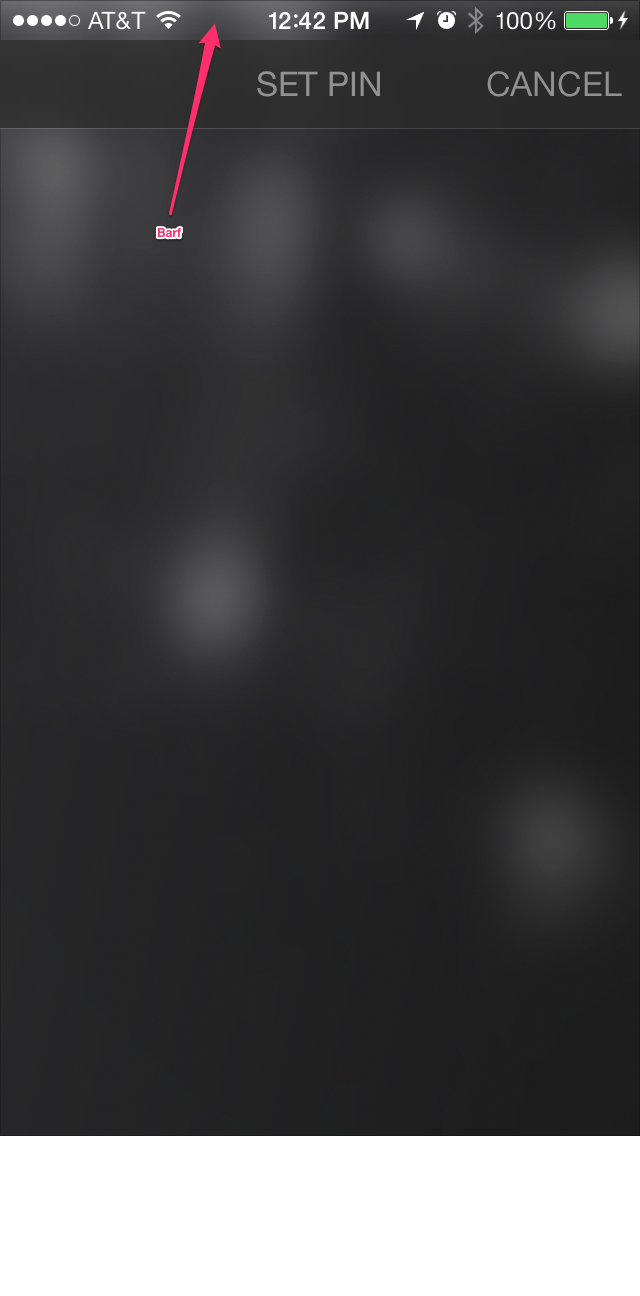
You can see that the nav bar sticks out like a sore thumb. So to fix this, here’s what you’ll need to do:
1. Make sure (in your storyboard scene) that your UINavigationBar is set to ‘Translucent’

2. Set the delegate property of your UINavigationBar to your View Controller (or some class that implements the UINavigationBarDelegate protocol).
3. In your delegate class (e.g. your View Controller) implement the following code:
- (UIBarPosition)positionForBar:(id )bar

{

    return UIBarPositionTopAttached;

}
And now you should see something like this:

Hope this helps!
“Delete all your comments. If it was hard to write it should be hard to read”
-anonymous
 Double Burrito Day